
Quick scan · deleted files
Reads file-system metadata to recover names, directory structure and timestamps. Best for recent deletions that have not been overwritten. Results carry a quality grade.

Capabilities
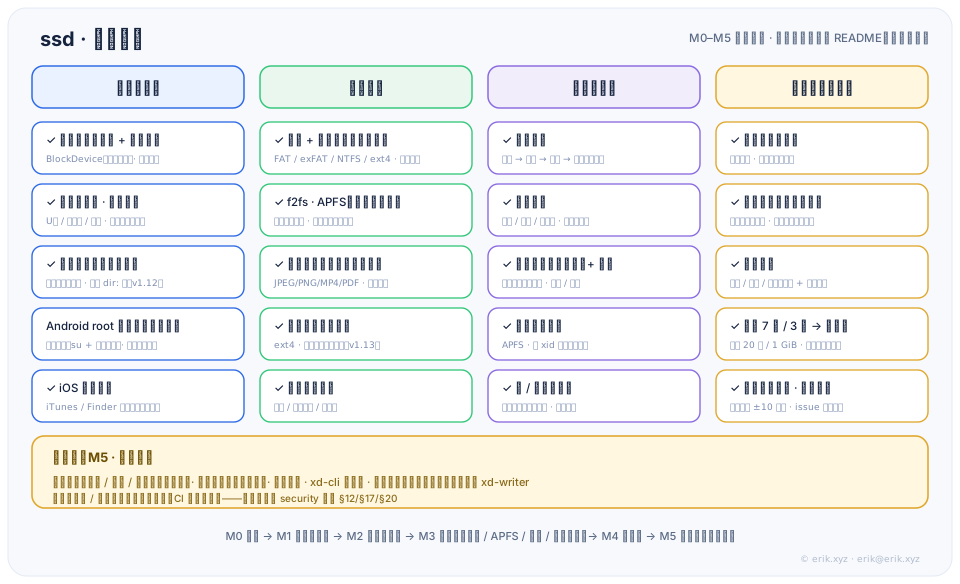
From the M0 foundation to the M5 pro edition, every layer serves one goal: recover what can be recovered without damaging the source, and be explicit about what cannot be recovered.
Recovery
Reads file-system metadata to recover names, directory structure and timestamps. Best for recent deletions that have not been overwritten. Results carry a quality grade.
Recovers by file signature when metadata is gone. JPEG / PNG / MP4 / PDF structure validation reduces false positives, with honest truncation and a “carved-only” grade.
Use any folder as a source (dir: source) — useful for backup directories and copies of old drives. Exports preserve the subdirectory tree.
Scan only a subtree on large devices (scan.start path); deleted files inside the subtree are recovered normally. Other file systems are rejected explicitly, never silently widened.
Engine matrix
As long as the device appears as a block device, it follows the same read-only path. Every engine has synthetic fixtures, an external oracle, or a kernel e2e gate.
| File system | Typical media | Core capability | Status |
|---|---|---|---|
| FAT12 / 16 / 32 | USB drives, SD / TF cards | SFN + LFN directory entries, chain reads, contiguous fallback | Available |
| exFAT | Large USB drives, camera cards | Directory-entry set validation, NoFatChain contiguous reads | Available |
| NTFS | External drives, Windows disks | Full $MFT parsing, unused records, $Bitmap grading | Available |
| ext4 | Linux disks, Android storage | jbd2 journal overlay, scoped path subtree | Available |
| f2fs | Android internal storage | Parsing, deleted-file recovery, recovery-rate gate | Available |
| APFS | macOS disks | Object headers / omap / B-trees, snapshot view | Available; real-device chain pending |
UI & delivery
Device / folder source → scan → results → preview → recover. Pagination, filters, quality badges, multi-select and a per-file report.
Separate dropped-privilege worker; three destination checks (different device / no overwrite / free space); never deletes existing files; symlink write-through is rejected.
Follow the system or switch manually; changes take effect immediately. Contract copy is shared across three surfaces, including the store description and the in-app capability page.
Licensing & pro edition
xd-cli: a thin shell over the engine with the same two-phase and audit discipline as the GUI.xd-writer binary; daemon / xd-cli contain zero write symbols.Mobile
Import an iTunes / Finder local backup, parse its structure, then browse, preview and export items by type. The encrypted-backup chain (keybag / PBKDF2 / RFC 3394 / AES-256-CBC) is implemented in the core; the password stays in memory and is never written to disk.
Honest boundary: items deleted after the backup was taken are not in the backup and are out of scope. Current verification uses synthetic backup samples; real-device backups are pending. Android root block-device scanning is only a skeleton and is shown as “not connected”.
Architecture
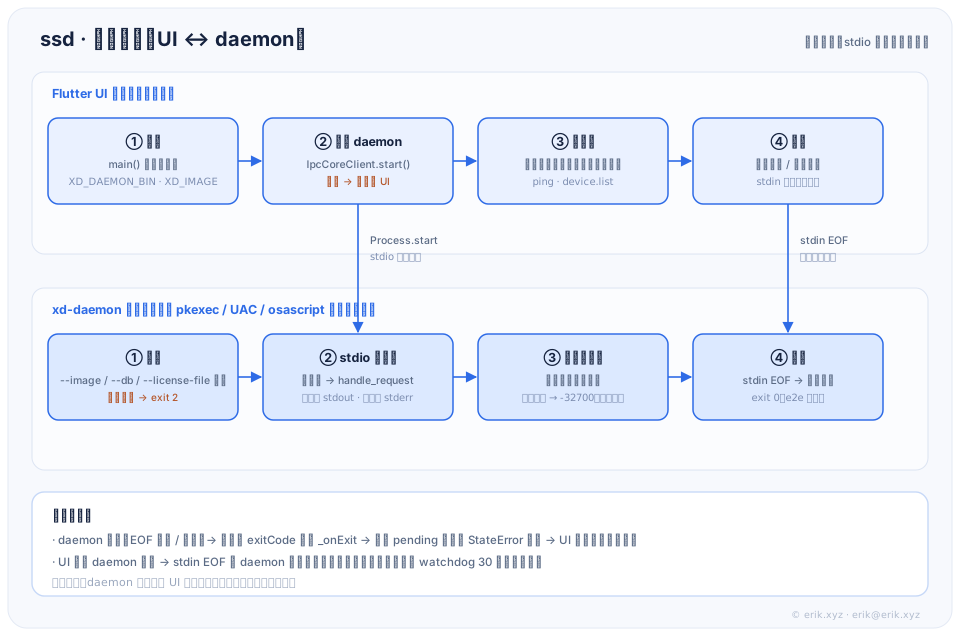
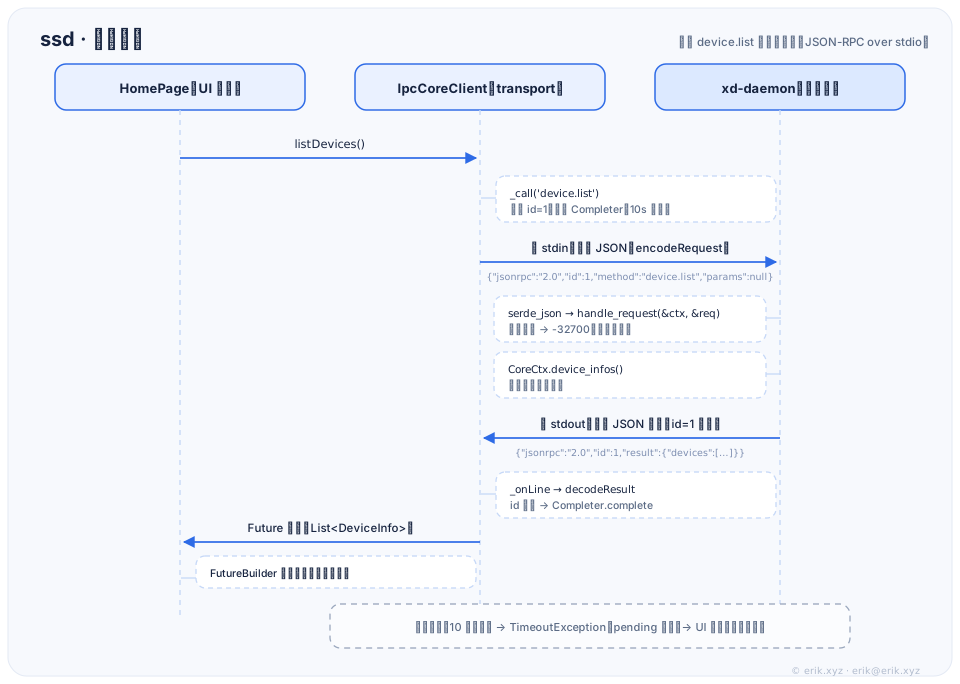
The Flutter UI owns state and presentation only. On desktop, the engine runs in a separate privileged daemon over line-oriented JSON-RPC on stdio. A UI crash or daemon crash cannot take the other down.
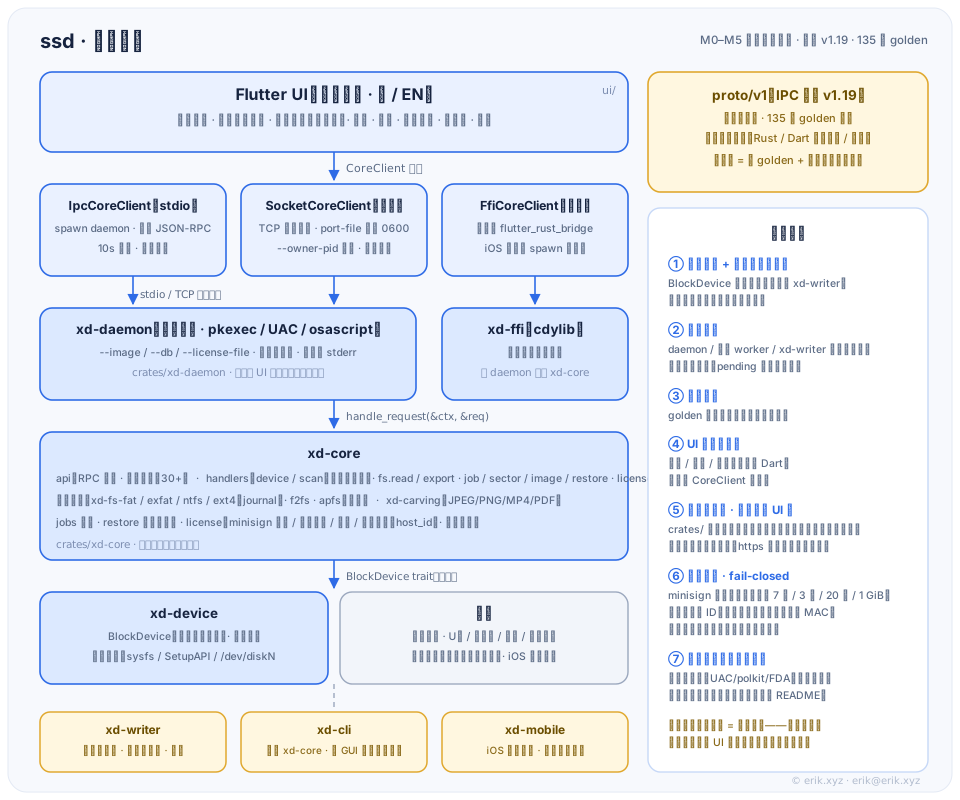
proto/v1 is the single source of truth. Rust and Dart both decode and encode the same golden cases; a contract change must update three surfaces together.
BlockDevice has no write interface. The recovery path cannot reach write capability; two executable gates pin this: the write-surface manifest and the binary symbol table.
daemon, export worker and xd-writer are separate processes. Pending requests wake with errors if the daemon dies, and the UI can retry.
Lifecycle & request cycle
Iterations
Milestones move in order: read-only first, then recovery, then productization, then the pro edition. Every capability has a test or gate instead of a review memory.
Contract, read-only device abstraction, end-to-end handshake
FAT / exFAT, carving, four-page UI, platform closure
NTFS, ext4, MP4 / PDF carving
Licensing, updates, release pipeline; write-back engine and CLI
xiaodun → ssd; folder recovery; English UI
dir: source and Chinese / English UIScoped path scan + three safety fixes
Time / count / size quotas, one license one machine
iPhone backup import and parsing
7 days ∧ 3 sessions; scan failure reasons surfaced
One-machine verify code, full rebrand, about-page fix, all-in-one deb
Boundaries
These are the unsolvable-at-the-software-level cases and the parts not yet verified. Stating them is more useful than promising “everything can be recovered”.
Unsolvable in software: physical media damage (controller failure, lost firmware), hardware-encrypted drives, TRIM already executed on SSDs / cards, and heavy overwrite. Stop writing to the media immediately after data loss.
Not yet verified: real USB / camera-card end-to-end paths, real UAC / polkit / FDA dialogs, Windows / macOS real-device paths, APFS real-device raw disk and Apple production snapshots, Android root real-device chain, real iPhone backups.
Android note: ssd does not provide root functionality and does not modify the system. Android root block-device recovery is a “not connected” placeholder; non-root source is not implemented. On Android 10+ (FBE), deleted file content usually cannot be recovered.